
📋 In This Article
Introduction — What is NourishAI?
In an era where AI tools are increasingly locked behind paywalls, subscriptions, and complex API setups, we asked ourselves a simple question: can we build a genuinely useful, AI-style health application that runs entirely in a browser — with zero backend, zero API keys, and zero cost?
The answer was a resounding yes. The result is NourishAI — a Personalised Health & Diet Planner that calculates your BMI, daily calorie needs, water intake, and protein goals, then generates a complete tailored meal plan and activity routine — all calculated client-side in pure HTML, CSS, and JavaScript.
"We wanted to prove that thoughtful logic and smart design can create an AI-feel experience — no cloud compute required."
This article walks through every stage of the build: from the initial concept, the code architecture, the design system, all the way to uploading the finished file through cPanel and seeing it live at ausjournal.com/planner11.html.
Why Pure HTML? The No-API Advantage
Most AI-powered health apps rely on a server making real-time calls to OpenAI, Claude, or similar APIs. This introduces latency, cost, rate limits, and — critically — requires exposing an API key either on a server or (dangerously) in the browser.
Our approach was different. By encoding the intelligence directly as rule-based logic and nutritional calculation formulas in JavaScript, we achieved several important benefits:
Privacy-First by Design
Because all calculations happen locally in the user's browser, none of the personal health data — weight, height, medical conditions, food preferences — ever leaves their device. This is a significant ethical advantage over cloud-based health tools.
Tools & Environment Used
One of the most satisfying aspects of this project was how minimal our toolset was. We deliberately avoided complex frameworks and build pipelines:
Claude AI (by Anthropic)
Used as our development co-pilot — generating HTML structure, CSS design system, and JavaScript logic from natural language prompts. No API key was embedded in the final file; Claude was used only during the development phase in the chat interface.
cPanel File Manager
InteractiveDNS cPanel (hosting ausjournal.com) provides a built-in File Manager and code editor. We uploaded the single HTML file directly to the /public_html/ directory.
Google Fonts (CDN)
The Inter and Playfair Display fonts are loaded via Google's CDN. This is the only external dependency in the entire project — and it degrades gracefully with fallbacks.
cPanel Code Editor
For quick iterations and tweaks after upload, we used cPanel's built-in file editor — visible in Image 2 above. This allowed fast edits directly on the server without re-uploading.
Step-by-Step Build Guide
Step 1 — Define the Feature Set
Before writing a single line of code, we mapped out exactly what the app needed to do. Using Claude AI in a chat session, we described our vision: "Build a health planner that takes user profile inputs (age, weight, height, gender, activity level, goal, and dietary preferences), calculates BMI, calorie target, water and protein goals, and generates a daily meal plan and activity suggestions."
Step 2 — Architect the HTML Structure
We asked Claude to scaffold a single-page HTML application with four main sections: Profile, My Plan, Meals, and Activity. The key architectural decision was to use a tab-based navigation system — all content lives in the DOM simultaneously, with CSS toggling visibility. This means zero page loads and instant transitions.
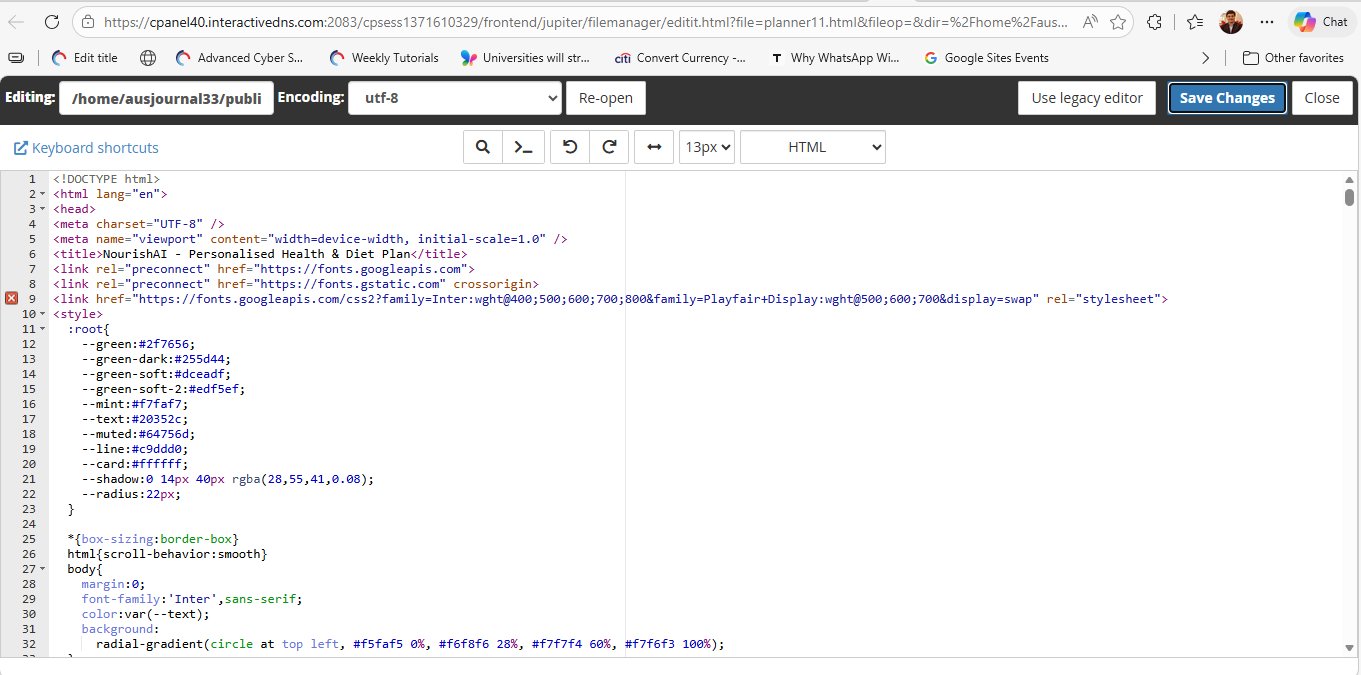
/home/ausjournal33/public_html/ directory. Notice the CSS custom properties (variables) defining the entire green-themed design system from lines 11–23.
Step 3 — Build the Calculation Engine
The "AI" in NourishAI is pure applied science. We implemented four core calculations as JavaScript functions:
BMI Calculation
Standard WHO formula: BMI = weight(kg) / height(m)². The result is classified into Underweight, Normal, Overweight, or Obese categories to personalise recommendations.
Calorie Target (TDEE)
Using the Mifflin-St Jeor equation for Basal Metabolic Rate (BMR), multiplied by an activity factor (sedentary → very active). The goal modifier then adjusts this up or down for muscle gain, weight loss, or maintenance.
Water Intake
Calculated as 35ml per kg of body weight, with an upward adjustment for active users. Displayed as litres, rounded to one decimal place.
Protein Goal
Set at 0.8g/kg for sedentary users, scaling up to 1.6–2.2g/kg for those aiming to build muscle or who are very active — based on current sports nutrition guidelines.
Step 4 — Design the Meal Plan Generator
Rather than calling an AI API, we built a curated database of meal options categorised by cuisine type (Indian, Mediterranean, Western, Vegetarian), meal time (breakfast, snack, lunch, dinner), and calorie band. The JavaScript engine then selects meals that fit within the user's daily calorie budget, respecting their stated food preferences.
Each meal card displays the food name, recommended time, calorie count, and a macronutrient breakdown (carbs, protein, fat) — all pre-calculated and stored as data within the file.
Step 5 — Activity & Lifestyle Engine
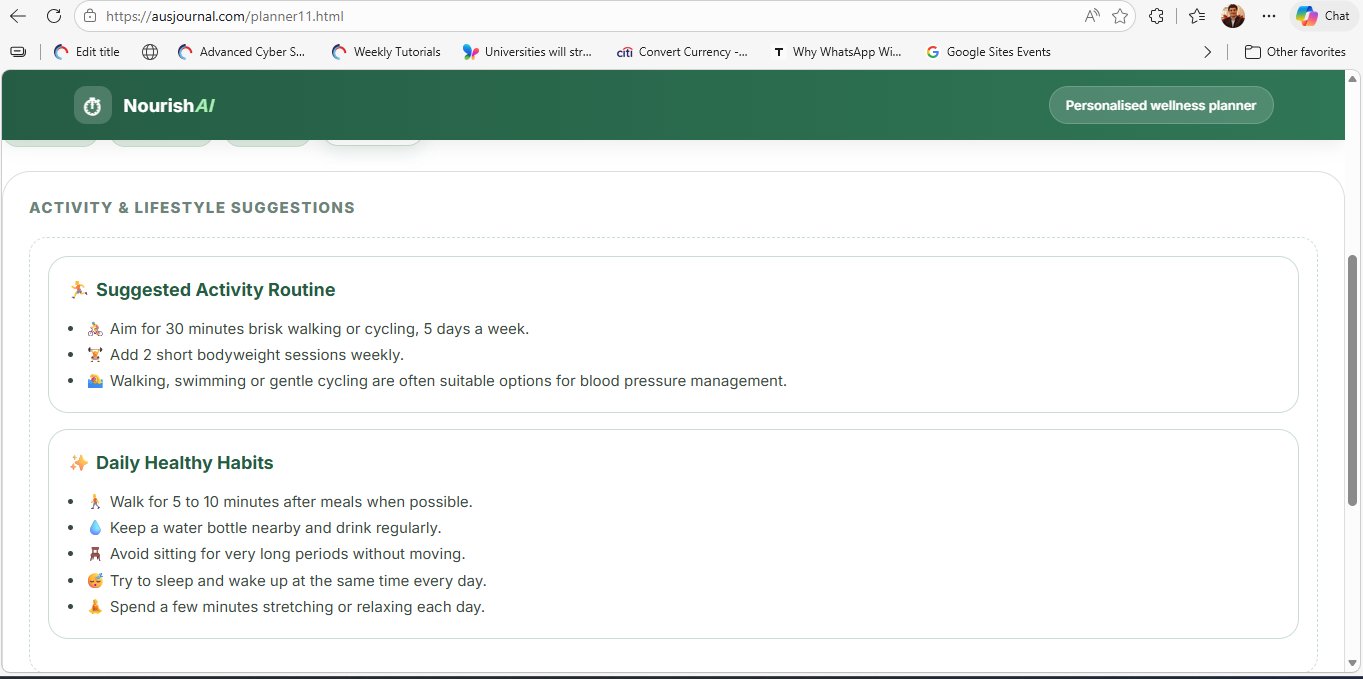
The activity recommendations are generated based on the user's goal, current BMI, and any health conditions flagged in the profile form. Conditions like high blood pressure automatically surface lower-impact suggestions (walking, swimming) while deprioritising high-intensity options. All logic is handled by a series of conditional rules in JavaScript.
Deploying to cPanel — ausjournal.com
Once the HTML file was complete and tested locally in the browser, deployment was a single-step process. Here's exactly how we published it to ausjournal.com:
Log in to cPanel
Access your cPanel dashboard at your hosting provider's URL (in our case, cpanel40.interactivedns.com:2083). Log in with your hosting account credentials.
Open File Manager
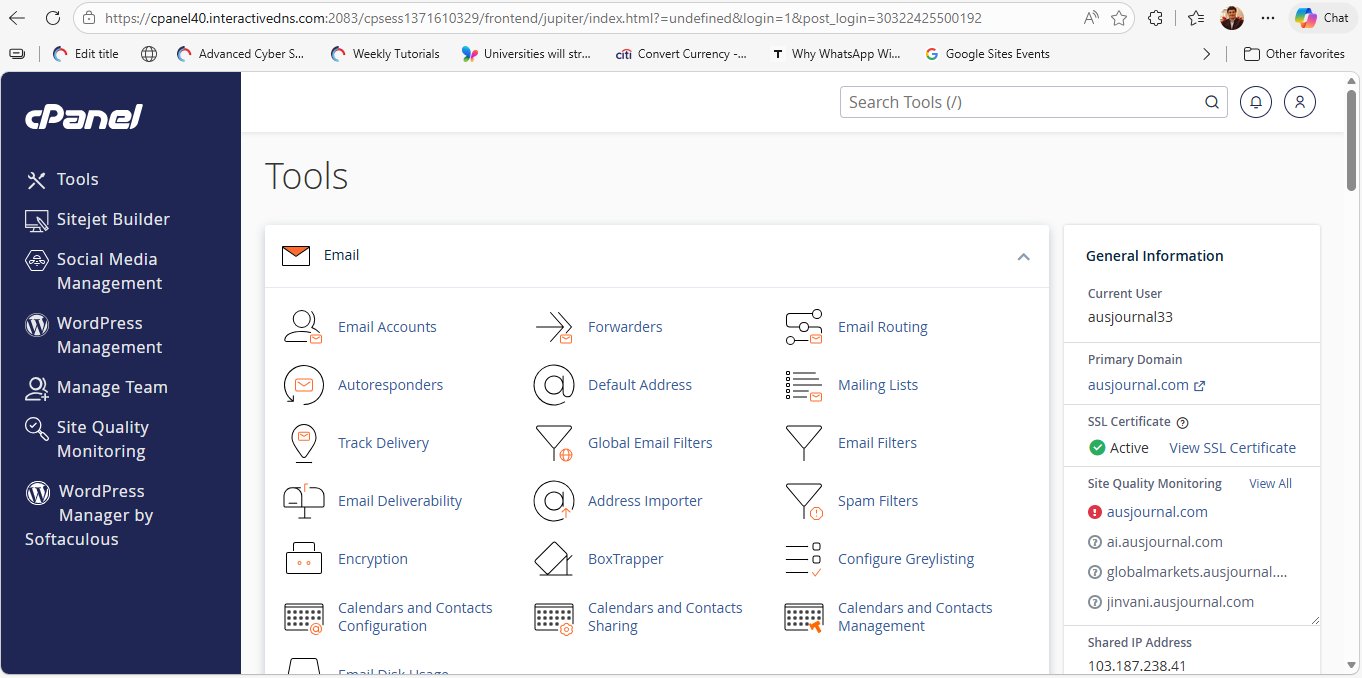
From the main Tools dashboard (Fig. 1), scroll down to the Files section and click File Manager. Navigate to your public_html folder — this is the web root for your domain.
Upload the HTML File
Click the Upload button in the File Manager toolbar. Select your planner11.html file from your local machine. The upload completes in seconds — the file is just ~50KB of plain text.
Test in Browser
Navigate to https://yourdomain.com/planner11.html in your browser. Since there's no server-side processing, the page loads instantly and works immediately — no database setup, no environment variables, no SSL issues with API calls.
Edit Live with cPanel Editor
For quick tweaks, right-click the file in File Manager and choose Edit to open the built-in code editor (Fig. 2). Changes take effect immediately upon saving — perfect for small copy edits or colour adjustments.
Results & Live Demo
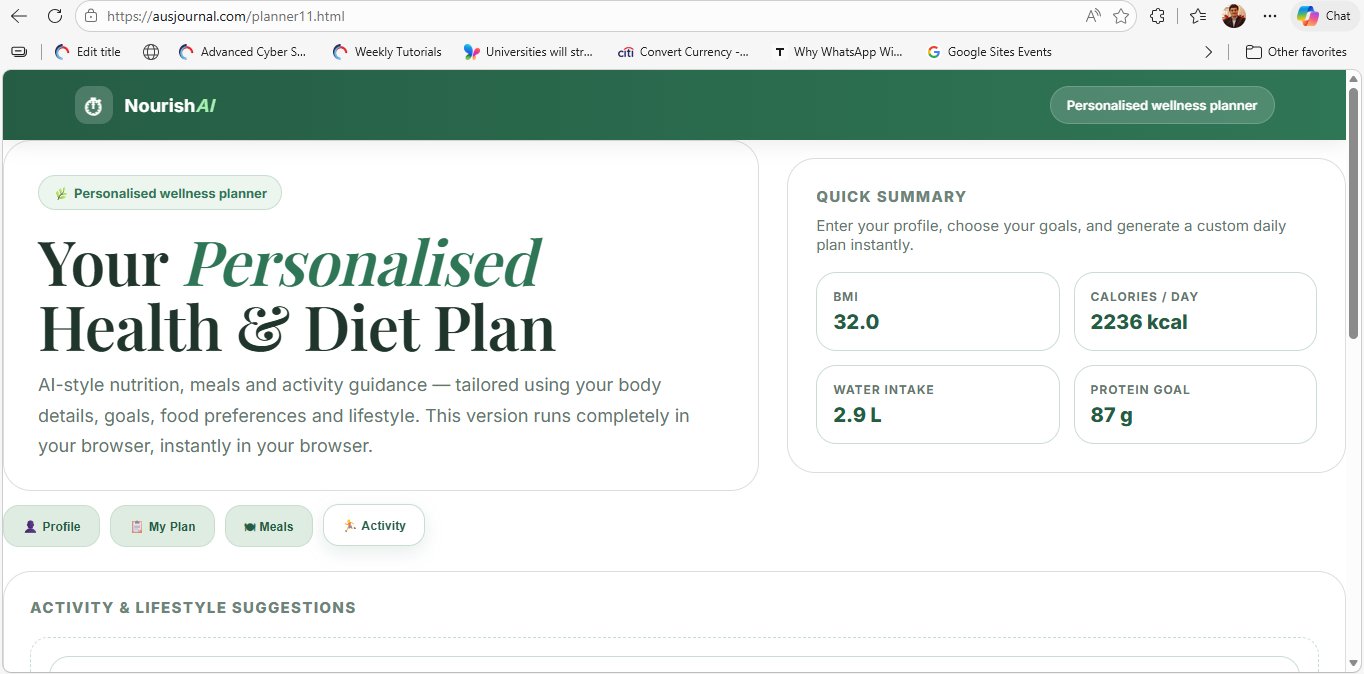
The finished application exceeded our expectations. Here's a look at NourishAI running live at ausjournal.com/planner11.html:
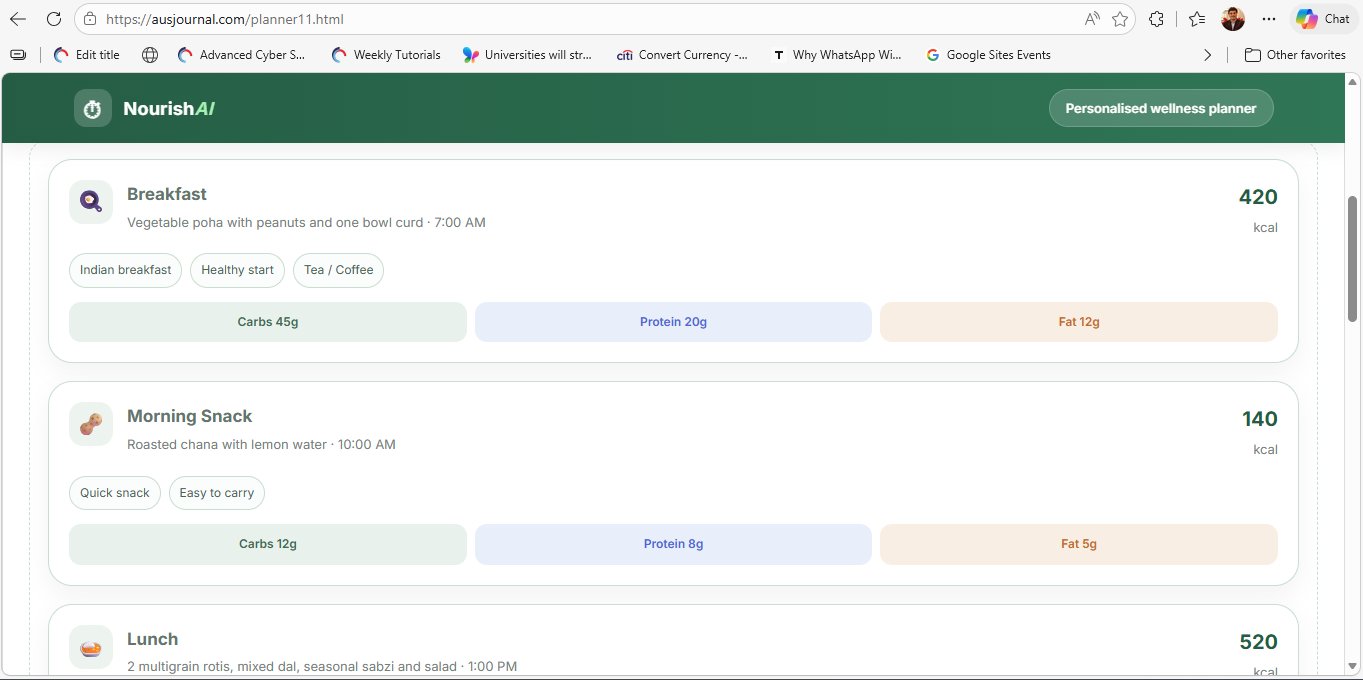
Fully Working on Live Domain
The app is accessible at ausjournal.com/planner11.html with SSL active (as seen in the browser address bar). Page load time is under 1 second. All four tabs — Profile, My Plan, Meals, and Activity — function perfectly on both desktop and mobile browsers.
Key Learnings & What's Next
This project taught us several important lessons about AI-assisted development and the power of constraint-driven design:
1. AI as Co-Developer, Not Replacement
Claude was instrumental in accelerating development — generating the initial scaffold, suggesting design token names, and debugging logic errors. But the quality of the output was entirely dependent on the quality of our prompts. Clear, specific instructions produced excellent code; vague requests needed multiple refinement rounds.
2. Client-Side Logic Can Be Surprisingly Powerful
Many developers default to server-side processing out of habit. This project proved that nutritional science calculations, personalisation logic, and even a form of "AI recommendations" can be implemented entirely in the browser — with zero ongoing infrastructure cost.
3. cPanel Is a Surprisingly Capable Development Environment
The combination of File Manager uploads and the built-in code editor makes cPanel a fully functional deploy-and-iterate environment for single-file web apps. For content-focused publishers like AusJournal, this workflow is fast, reliable, and requires no command-line knowledge.
What's Next for NourishAI
Our roadmap includes adding a 7-day meal plan view, a progress tracker using localStorage, and an optional integration with the Claude API (via a server-side proxy to keep the key secure) to allow free-text questions about nutrition. We're also exploring a PDF export feature so users can download their personalised plan.
"The best tool for the job isn't always the most complex one. Sometimes a single HTML file, thoughtfully crafted, is all you need."